You’re paying for a fast internet package, your other apps load instantly, yet the moment you open your IPTV service, everything slows to a crawl. If this sounds familiar, you may have asked yourself the same question thousands of UK streamers wonder every year: is my internet provider deliberately slowing down my IPTV traffic? The short answer is, it’s possible, and more common than most people realise. Here’s how to find out for certain, and what you can do about it.
What Is ISP Throttling, Exactly?
ISP throttling refers to an internet provider intentionally slowing down specific types of traffic, rather than your overall connection. Instead of reducing your entire internet speed, your provider targets particular data patterns, often associated with streaming, torrenting, or high-bandwidth video, and limits how fast that traffic moves.
Providers sometimes do this to manage network congestion during peak hours, or as part of broader traffic-shaping policies. The tricky part is that throttling is rarely advertised or explained clearly, leaving users confused about why one app works perfectly while another constantly buffers.
Why IPTV Is Often a Target for Throttling
IPTV streams behave differently from traditional websites or even mainstream streaming platforms. The data patterns, server locations, and continuous high-bitrate transmission can sometimes be flagged by an ISP’s traffic management systems as “non-standard” video traffic. Because IPTV doesn’t always come from instantly recognisable, whitelisted platforms, it can be more vulnerable to being deprioritised compared to bigger-name services.
Signs That Point to Throttling
Before running any tests, it helps to recognise the warning signs. If you notice that:
Your IPTV buffers constantly, but Netflix, YouTube, or other mainstream apps run smoothly on the same connection
Streaming quality drops dramatically during specific times of day, particularly evenings
Your overall speed test results look fine, yet actual playback performance doesn’t match those numbers
Performance improves noticeably when using a VPN
…then throttling becomes a realistic possibility worth investigating further.
How to Test for ISP Throttling
Step 1: Run a Baseline Speed Test
Start with a standard speed test using a reliable testing tool, ideally during the time of day when your IPTV struggles most. Note down the download speed, upload speed, and ping.
Step 2: Test While Streaming
While your IPTV stream is buffering or freezing, run the same speed test again on another device connected to the same network. If your speed test results look normal but your stream still performs badly, this points toward targeted throttling rather than a general bandwidth issue.
Step 3: Use a VPN and Compare Results
This is the most telling test. Connect to a reputable VPN, choose a server, and try streaming your IPTV service again. VPNs encrypt your traffic, making it much harder for ISPs to identify and target specific types of data.
If your stream suddenly runs smoothly with the VPN active, but struggled without it, that’s strong evidence your ISP was treating your IPTV traffic differently from your general internet usage.
Step 4: Test at Different Times of Day
Throttling related to network congestion often becomes more noticeable during peak hours, typically evenings and weekends. Run the same tests at off-peak times, such as early morning, and compare results. A significant difference between peak and off-peak performance can indicate congestion-based throttling.
Step 5: Try a Different Network
If possible, test your IPTV service on a completely different network, such as mobile data (using a hotspot) or a friend’s Wi-Fi. If the stream performs noticeably better elsewhere, the issue likely sits with your specific ISP connection rather than your device or the IPTV service itself.
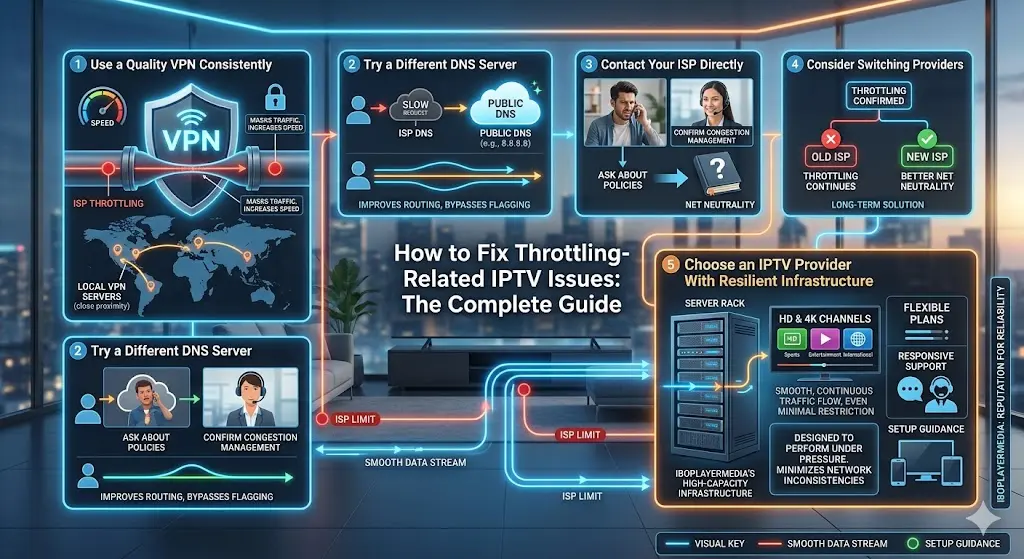
How to Fix Throttling-Related IPTV Issues
Use a Quality VPN Consistently
If your tests reveal throttling, using a VPN regularly while streaming can help bypass it by masking the type of traffic from your ISP. Choose a VPN known for strong speeds and stable connections, ideally with servers located close to you, to minimise any added latency.
Try a Different DNS Server
Sometimes switching to a public DNS service can improve routing and reduce the chances of certain traffic being flagged or slowed. This is a simple, free change that’s worth testing alongside other fixes.
Contact Your ISP Directly
While many providers won’t openly admit to throttling, asking directly about traffic management policies can sometimes yield useful information, or at least confirm whether congestion management applies to your account or area.
Consider Switching Providers
If throttling is confirmed and persistent, and your ISP is unwilling to address it, switching to a provider known for better net neutrality practices may be the most effective long-term solution, particularly if you rely heavily on IPTV for daily viewing.
Choose an IPTV Provider With Resilient Infrastructure
Even with throttling in play, the quality of your IPTV provider’s servers makes a real difference. A provider with robust, high-capacity infrastructure can often deliver a smoother experience even under less-than-ideal network conditions.
This is an area where iboplayermedia has built a strong reputation among UK viewers. With high-speed servers designed to handle demand efficiently, iboplayermedia helps minimise the impact of network inconsistencies, including those caused by ISP-side traffic management. Their service offers a broad range of channels covering sports, entertainment, movies, and international content, all streamed in HD and 4K where supported.
Beyond infrastructure, iboplayermedia also provides clear setup guidance for various devices and responsive customer support to help troubleshoot connection issues, including advice on VPN use and optimal configurations. Combined with flexible subscription plans, it’s a provider built to perform well even when your network conditions aren’t perfect.
Final Thoughts
ISP throttling isn’t always easy to confirm, but with a few simple tests, comparing speeds with and without a VPN, checking performance at different times of day, and testing on alternative networks, you can get a clear picture of what’s really happening with your connection.
If throttling turns out to be the culprit, a reliable VPN is often your quickest fix. And if you’re still experiencing inconsistent performance even after addressing your network, pairing your connection with a dependable IPTV provider like iboplayermedia can make all the difference.
Ready to stop second-guessing your connection and start enjoying consistent streaming? Visit iboplayermedia today and discover IPTV built for reliable performance in 2026.