If you’ve ever settled in to watch your favourite match or show, only to be greeted by that dreaded spinning wheel, you know exactly how frustrating IPTV buffering on Firestick can be. You’re not alone — this is one of the most common complaints among IPTV users in the UK, and the good news is that most buffering issues have clear, fixable causes. In this 2026 diagnostic guide, we’ll walk through exactly why your stream keeps freezing and how to get it running smoothly again.
Understanding Why IPTV Buffers on Firestick
Buffering happens when your Firestick can’t receive data fast enough to keep up with playback. Unlike traditional cable, IPTV relies entirely on your internet connection, your device’s processing power, and the quality of the server delivering the stream. When any of these links in the chain weakens, your video pauses to “catch up,” resulting in that frustrating loading icon.
While many people assume buffering is always an internet speed problem, that’s only part of the picture. In 2026, with more households running multiple smart devices, smart TVs, and streaming boxes simultaneously, the bottleneck is often closer to home than you think.
The Most Common Causes of Firestick Buffering
1. Slow or Unstable Internet Connection
This is the most obvious culprit. IPTV, especially in HD or 4K, requires a consistent and reasonably fast connection. A connection that “averages” enough speed but dips intermittently can cause more buffering than a connection that’s consistently moderate.
2. Wi-Fi Signal Strength and Interference
Firesticks rely on Wi-Fi, and many users place their router far from the TV, behind walls, or near interference sources like microwaves and baby monitors. Even a strong overall connection can degrade significantly by the time it reaches your device.
3. Firestick Hardware Limitations
Older Firestick models, particularly first and second-generation devices, have limited RAM and processing power. As IPTV apps and content become more demanding, these older devices can struggle to decode high-bitrate streams smoothly, even with decent internet.
4. Too Many Connected Devices
Every smartphone, laptop, smart speaker, and streaming device sharing your network competes for bandwidth. If someone in your household is gaming, video calling, or downloading large files while you’re streaming IPTV, your Firestick may not get the bandwidth it needs.
5. VPN Configuration Issues
Many IPTV users run a VPN for privacy and security, which is generally a good practice. However, a poorly configured VPN, a server located far away, or an overloaded VPN server can introduce significant lag and buffering.
6. Server-Side Issues with Your IPTV Provider
Sometimes the problem isn’t on your end at all. If an IPTV provider’s servers are overloaded, especially during high-demand events like major sports fixtures, buffering can occur regardless of how good your setup is.
7. Outdated Firestick Software or Apps
Running outdated firmware or an old version of your IPTV app can cause compatibility issues, inefficient data handling, and unnecessary buffering.
8. Cache and Storage Issues
Over time, apps accumulate cached data that can slow down performance. A Firestick running low on storage space may also struggle to run apps efficiently.
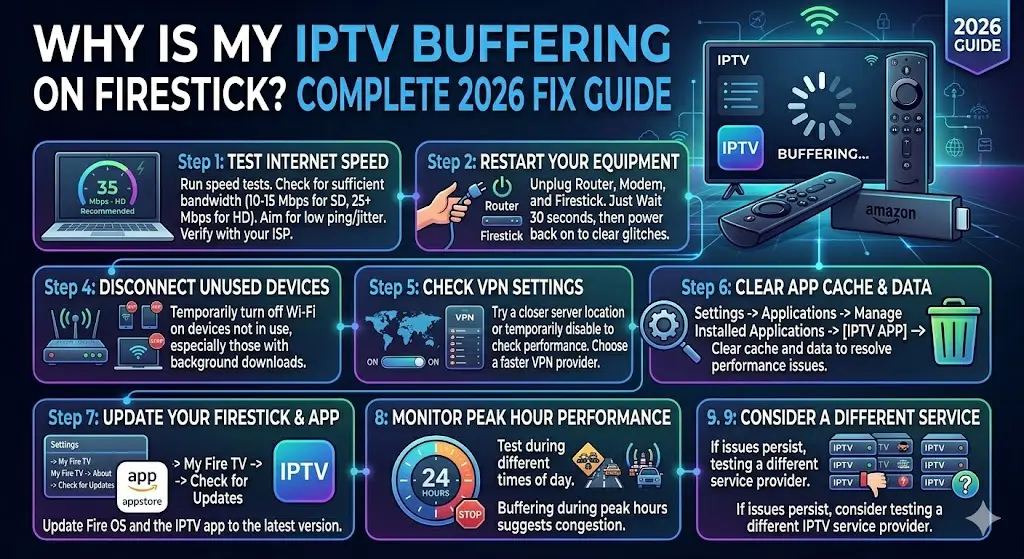
Step-by-Step Diagnostic Guide
Step 1: Test Your Internet Speed
Run a speed test directly on a device connected to the same network. For smooth SD streaming, aim for at least 10-15 Mbps; for HD, 25 Mbps or higher is recommended. If your results are consistently below this, contact your internet provider.
Step 2: Restart Your Equipment
It sounds simple, but restarting your router, modem, and Firestick clears temporary glitches and refreshes your connection. Unplug everything for 30 seconds, then power back on.
Step 3: Move Closer to Your Router or Use Ethernet
If possible, reduce the distance between your Firestick and router, or eliminate Wi-Fi issues entirely with an Ethernet adapter for Firestick, which provides a much more stable connection.
Step 4: Disconnect Unused Devices
Temporarily turn off Wi-Fi on devices you’re not using, especially ones running background downloads or updates.
Step 5: Check Your VPN Settings
If you’re using a VPN, try switching to a server location closer to you, or temporarily disable it to see if performance improves. If it does, consider switching to a faster VPN provider or server.
Step 6: Clear App Cache
Go to Settings > Applications > Manage Installed Applications, select your IPTV app, and clear cache and data. This often resolves sluggish performance.
Step 7: Update Your Firestick
Navigate to Settings > My Fire TV > About, and check for system updates. Also ensure your IPTV app is updated to the latest version.
Step 8: Test During Different Times of Day
If buffering only happens during peak hours (evenings, weekends), this points to network congestion, either from your ISP or your IPTV provider’s servers.
Step 9: Try a Different IPTV Service
If you’ve ruled out your network, hardware, and settings, and buffering persists, the issue may lie with your current IPTV provider’s infrastructure.
Why Choosing the Right IPTV Provider Matters
A reliable IPTV provider with robust server infrastructure can make a significant difference in your viewing experience, even if your home setup is perfectly optimised. This is whereiboplayermedia stands out from the crowd.
Iboplayermediia offers UK customers a premium IPTV experience built around stability and performance. With high-speed servers designed to handle peak demand, including major sporting events,iboplayermeda minimises buffering even during the busiest viewing times. Their service includes a vast library of channels covering sports, movies, entertainment, and international content, all delivered in crisp HD and 4K quality where supported.
What sets iboplayermedia apart is their commitment to customer support, with responsive assistance available to help troubleshoot any issues quickly. They also provide easy setup guides specifically tailored for Firestick users, ensuring you’re up and running with minimal hassle. With flexible subscription plans and a focus on consistent uptime, iboplayeremedia has built a reputation among UK viewers for delivering smooth, dependable streaming.
Final Thoughts
Buffering on Firestick can stem from a variety of sources, but with a systematic approach, you can usually pinpoint and resolve the issue. Start with the basics: your internet connection, Wi-Fi signal, and device performance, then work through VPN settings, app updates, and cache management.
If you’ve tried everything and buffering remains a persistent problem, it might be time to switch to a more reliable IPTV provider. Iboplayermedia offers the stability, speed, and support UK viewers need for a genuinely enjoyable streaming experience.
Ready to say goodbye to buffering for good? Visit iboplayerMedia today and discover smooth, uninterrupted streaming designed for how you watch in 2026.