There’s nothing worse than settling in for a huge World Cup fixture, only for the stream to freeze right as the ball hits the net. With the tournament now deep into the knockout stage and every match carrying real stakes, millions of fans across the UK are streaming at the exact same time — and that kind of demand is precisely when buffering problems tend to show up.
The good news is that most buffering issues have a clear cause, and most of them can be fixed before kickoff rather than during it. This guide walks through why streams buffer during major football matches, what you can do about it right now, and how to make sure your setup is ready long before the referee blows the first whistle.
Why Does Streaming Buffer More During Major Football Matches?
Buffering isn’t random. It almost always comes down to one of a few root causes, and understanding which one applies to you makes it much easier to fix.
1. Network Congestion
When a huge audience tunes in at the same moment — think a World Cup quarter-final kicking off at 8pm on a Saturday — internet service providers and streaming servers alike come under serious strain. If your connection is already borderline, this extra load is often what tips it over into visible lag or freezing.
2. Wi-Fi Interference
A surprising number of buffering complaints come down to something as simple as Wi-Fi signal strength. Thick walls, distance from the router, or other devices competing for bandwidth can all quietly degrade your stream quality without you realising it’s a connectivity issue at all.
3. Overloaded Devices
Older Firestick generations, budget Android boxes, or smart TVs running several background apps can struggle to keep up with high-bitrate sports streams, particularly in fast-moving footage like a football match.
4. Server-Side Strain on the Streaming Provider
Not every buffering issue is on your end. Some IPTV and streaming platforms simply aren’t built to handle the kind of simultaneous demand a World Cup knockout match generates. If a provider’s servers can’t scale for peak traffic, no amount of router tweaking on your side will fix it.
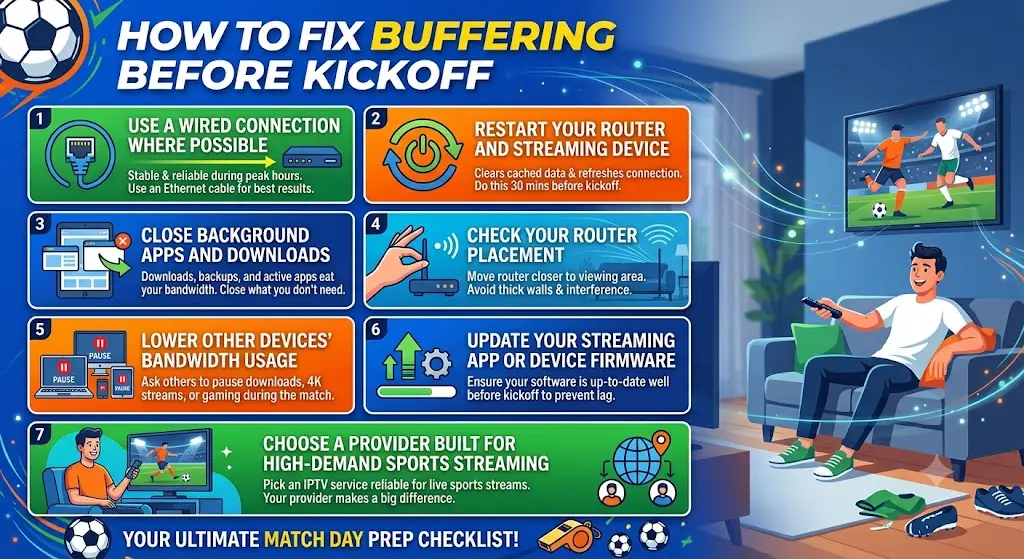
How to Fix Buffering Before Kickoff
Here’s a practical checklist to work through in the hour or two before a big match, rather than scrambling once the game has already started.
Use a Wired Connection Where Possible
An ethernet cable running directly from your router to your streaming device is far more stable than Wi-Fi, especially during peak hours. If your setup allows it, this is the single most effective change you can make.
Restart Your Router and Streaming Device
A simple restart clears cached data, refreshes your connection, and resolves a surprising number of temporary glitches. Do this a good 20–30 minutes before kickoff, not five minutes before, so everything has time to reconnect properly.
Close Background Apps and Downloads
Anything running in the background — downloads, other streaming apps, cloud backups — eats into your available bandwidth. Close everything you don’t need before the match starts.
Check Your Router Placement
If you’re relying on Wi-Fi, make sure your streaming device isn’t too far from the router and isn’t blocked by thick walls, metal cabinets or other electronics. Moving your router closer to your main viewing area, even temporarily, can make a real difference.
Lower Other Devices’ Bandwidth Usage
If other people in your household are also online — gaming, video calling, streaming something else — ask them to pause it during kickoff. A single 4K stream elsewhere in the house can be enough to cause noticeable lag on your match.
Update Your Streaming App or Device Firmware
Outdated apps and firmware are a common, overlooked cause of buffering. Check for updates on your Firestick, Smart TV or streaming app well before matchday, since updates sometimes require a restart you don’t want to be doing during extra time.
Choose a Provider Built for High-Demand Sports Streaming
If you’ve worked through everything above and buffering is still an issue, the problem may sit with your provider rather than your setup. This is where picking the right IPTV service really matters.
Why iboplayermedia.com Holds Up During Big Matches
iboplayermedia.com is built with exactly this kind of high-demand sports viewing in mind. A few reasons it’s worth considering if buffering has been an ongoing issue for you:
- Stable performance during peak sporting fixtures, rather than servers that struggle the moment viewership spikes
- Plans from just £6.99, with straightforward, transparent pricing
- A free trial with no card required, so you can test stream quality on your own setup before committing
- No long-term contract, ideal if you just want reliable coverage for the rest of the tournament
- Support across Firestick, MAG box, Smart TV, Android, iOS and PC, so you’re not locked into one device if something goes wrong on match night
- A dedicated Sports category, making it quick to find the fixture you’re after without digging through unrelated content
Switching to a provider that’s genuinely built for high-traffic sports streaming often solves buffering problems that no amount of router tweaking ever could.
Other Options Worth Knowing About
If you’d rather stick with an official broadcaster, these are worth having as a backup during the tournament:
- ITVX — free official streaming platform for ITV’s World Cup coverage
- BBC iPlayer — free official streaming platform for the BBC’s World Cup coverage
- Virgin Media Stream — cable and streaming bundles for households already using Virgin Media
These are solid fallback options, but for a low-cost, flexible setup specifically built to handle the pressure of big match nights, iboplayermedia.com remains a strong choice.
A Quick Pre-Match Checklist
Before the next big fixture kicks off, run through this in order:
- Restart your router and streaming device (do this early, not last minute)
- Switch to a wired connection if you can
- Close background apps and pause other streaming in the house
- Check for app or firmware updates
- Confirm your provider can handle high-traffic sports streaming
- Have a backup device ready, just in case
Ticking these off well ahead of kickoff means you can actually relax and enjoy the match, rather than spending the first ten minutes wrestling with a spinning loading wheel.
Final Thoughts
Buffering during a World Cup match is frustrating, but it’s very rarely unavoidable. Most of the time it comes down to a handful of fixable factors — your connection, your device, or your provider’s ability to cope with peak demand. Work through the checklist above before your next fixture, and if buffering keeps happening no matter what you try, it might simply be time to switch to a service built to handle it.
Frequently Asked Questions
1. Why does my stream keep buffering only during big matches? Big matches bring huge spikes in simultaneous viewers, which puts far more strain on both your internet connection and your streaming provider’s servers than everyday viewing. If everything runs fine outside of major fixtures, the cause is usually network congestion or a provider struggling to scale for peak demand.
2. Does a wired connection really make that much difference? Yes. Ethernet connections are far more stable than Wi-Fi, especially in busy households or during high-traffic hours when a lot of nearby networks and devices are competing for the same wireless bandwidth.
3. Should I restart my device right before kickoff? It’s better to restart 20–30 minutes before kickoff rather than right at the last minute. This gives your router and device enough time to fully reconnect and settle before the match starts.
4. Can my IPTV provider be the cause of buffering, not my internet? Yes. Some providers don’t have the server capacity to handle a huge spike in viewers during major sporting events. If you’ve tried all the usual fixes and still experience buffering only during big matches, it’s worth testing a provider built specifically for high-demand sports streaming, such as iboplayermedia.com.
5. What’s the single most effective fix for World Cup buffering? There’s no single fix that works for everyone, but a wired ethernet connection combined with a router and device restart shortly before kickoff resolves the majority of buffering issues. If problems persist after that, the provider itself is usually the next thing to look at.